I tried several vibe-coded Photoshop alternatives, but this one is by far the best
ArtCraft has been making the rounds for several weeks now, and I decided to see for myself how well it actually works against the software it aims to replace. More specifically, how PhotoCraft compares to Photoshop. What I found was surprising, not o...
ArtCraft has been making the rounds for several weeks now, and I decided to see for myself how well it actually works against the software it aims to replace. More specifically, how PhotoCraft compares to Photoshop. What I found was surprising, not only in how well the app performed, but how familiar it felt. While the legality of ArtCraft and its library of tools is decidedly murky at the moment, I found little to complain about in the software itself, and I was jumping between tools with an ease I've never been able to replicate in other photo-editing apps.
I don't have to relearn how to edit photos
My Photoshop muscle memory still works
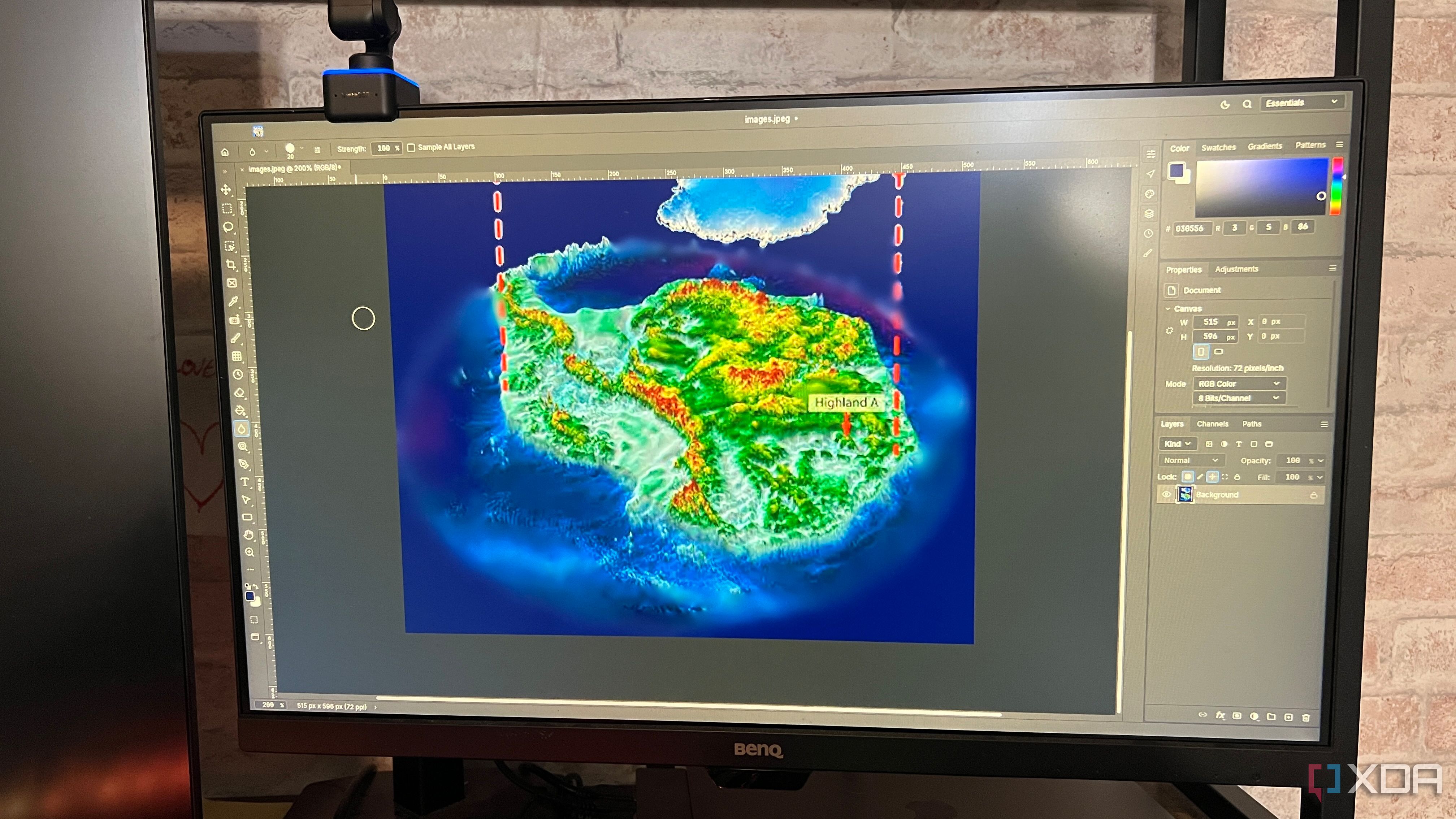
One of my biggest complaints with switching from Photoshop to GIMP is that things are similar, but just different enough that muscle memory no longer benefits me. I'd go to grab a tool, only to find it wasn't where I thought it was. PhotoCraft avoids that by offering nearly one-to-one parity with Photoshop in its layout. Switching from one tool to another was easy, as everything was where I expected it to be.
I wanted to edit an image and turn it into a map, but it had a few extra elements I didn't want. I was able to quickly crop it, adjust the view, and switch to the blur tool. I accomplished all of this within a couple of minutes without breaking my workflow, versus other tools I've used where I'd spend at least that much time looking for the tool I needed.
It works offline without a subscription
I don't need to spend a dime to tweak my photos
Adobe has only gotten more expensive as the years go on, especially once the company began adding AI features to its tools. There's a reason so many people still use Photoshop — it's one of the best tools out there, and it does have a few advantages over GIMP (although that window is closing quickly). But as I seek to completely eliminate subscriptions from my life, I wanted a solution that didn't involve Adobe.
PhotoCraft is such a close copy of Photoshop that I don't find myself wishing I could use Photoshop instead. It's free and open source, and there are native versions of ArtCraft for macOS, Windows, and Linux. You'll need to use the ArtCraft launcher, but it functions as a nice hub for all of the tools.
PhotoCraft doesn't make my aging hardware feel obsolete
My seven-year-old MacBook comfortably handles it
The app works well even on older devices, too. I tested it on a 2019 MacBook Pro, and not even an M-series, either; I'm still sporting Intel silicon. I find that most applications cause a bit of lag on my device, but PhotoCraft worked just fine. There are a lot of different tools coming to the market that rely on more advanced hardware to operate. That's especially true for anything that utilizes AI. PhotoCraft doesn't make unreasonable demands of my older laptop — in fact, Chrome eats up more system resources — and swapping between layers and tools was snappy and responsive. There weren't any noticeable delays when zooming in and out of the image, either.
I opened other, more complex files like the PSD of an old book cover design. I expected the additional layers and more advanced elements might impact performance, but I was surprised to find that it performed just as well on my machine as more basic files. I already know I'll need to upgrade my hardware soon, but I appreciate an app that takes a wide range of specs into consideration.
As impressed as I am, I'm not ready to trust PhotoCraft fully
It's still in early development
On PhotoCraft's GitHub page, the developers specifically and explicitly state that it's not a perfect replacement, especially for professional work. PhotoCraft shows a tremendous amount of promise, but it's still missing a few tools, lacks wide plugin compatibility, and its AI functionality is limited.
When the developers issue a warning like that, I pay attention. There are also legal concerns to take into account. While Adobe hasn't filed a suit against PhotoCraft, the software has been the subject of a lot of discussion. Reverse-engineering software as completely as PhotoCraft does is treading into uncharted territory, and I'm not entirely sure how the situation will play out.
PhotoCraft is one of the best Photoshop alternatives I've ever used
I'm thoroughly impressed by what PhotoCraft brings to bear, but that's also because it's basically just Photoshop minus the name. With a nearly identical interface and selection of tools, it doesn't feel that much different from opening up Adobe Creative Cloud and booting Photoshop.
I'm a fan, and this is a project I'll be watching closely. That said, I believe it still needs time to mature, so I'm not ready to completely wipe Adobe from my laptop. I'll probably stop using GIMP except in extreme circumstances, though; not only is PhotoCraft's interface familiar, but it runs faster than GIMP on seven-year-old laptops, too.
ArtCraft
OS
Windows, macOS, Linux
ArtCraft is a suite of applications that replicates many of Adobe's popular Creative Cloud apps, including Photoshop and Premiere.