After a week with a Googlebook, I can't shake the feeling I'm using an Android tablet disguised as a laptop
With a stack of Googlebooks to review sitting on my desk, I thought a good place to start would be unpacking what it's actually like to use Google's new laptop line and Googlebook OS for my day-to-day tasks. In this case, I've spent most of my time ...
With a stack of Googlebooks to review sitting on my desk, I thought a good place to start would be unpacking what it's actually like to use Google's new laptop line and Googlebook OS for my day-to-day tasks.
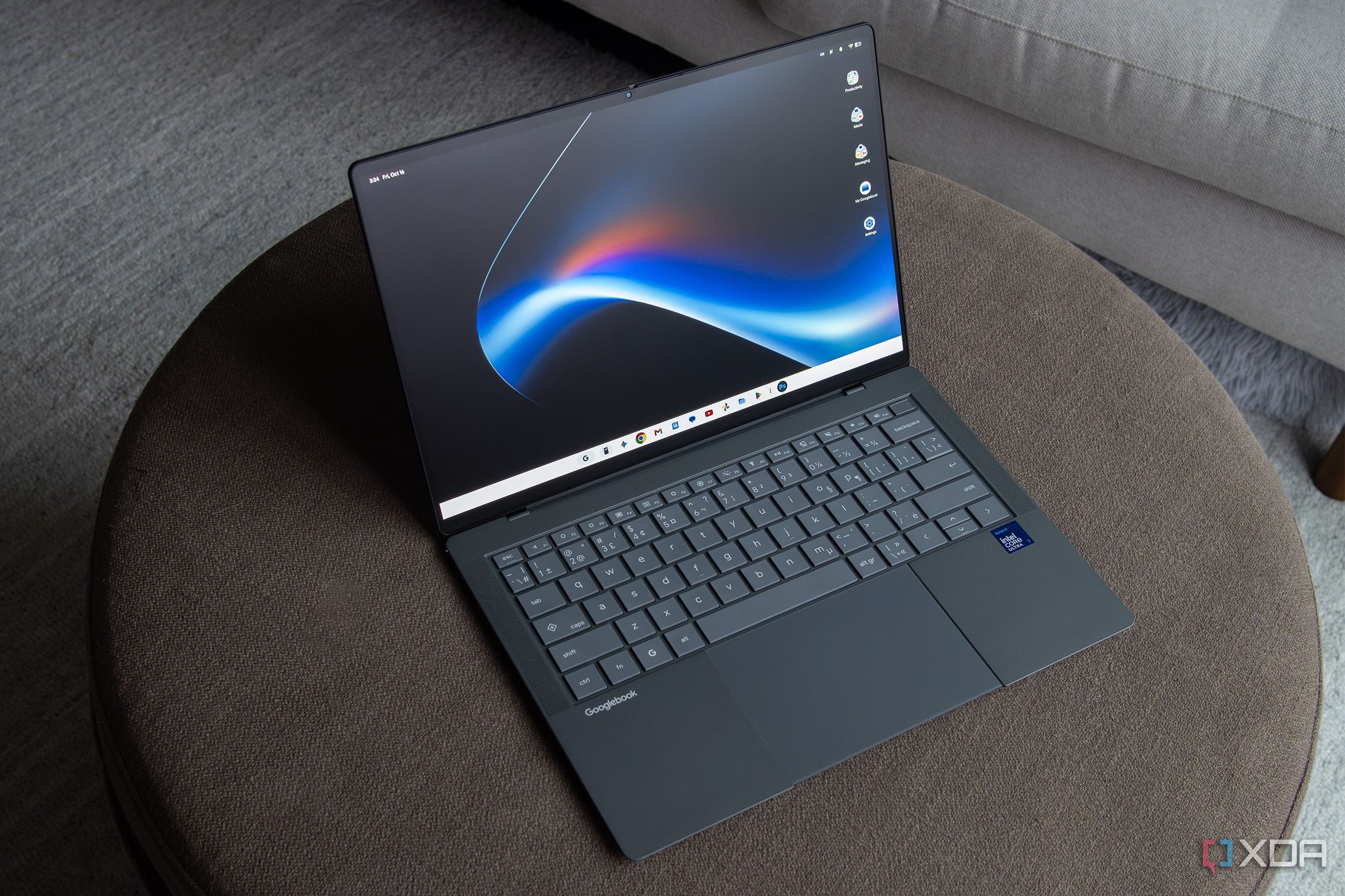
In this case, I've spent most of my time with Asus' Googlebook 14, so I'll start with its design before diving into Googlebook OS. (Acer, Dell, HP, and Lenovo are also part of the Googlebook launch lineup). The laptop I'm using features an Intel Core Ultra 7 355 (8 cores, up to 4.7GHz, 49 TOPS NPU), a 14-inch 2880 x 1800 OLED touchscreen with a 120Hz refresh rate display, 16GB of LPDDR5X RAM, and a 512GB SSD. For ports, it has two Thunderbolt 4 (USB-C) ports and two USB 3.2 (USB-A) ports, plus an HDMI 2.1b port, and a 3.5mm headphone jack.
I'm particularly fond of the laptop's ceramic-like feel, though its body has more flex to it than I'd like. The keys feature the right amount of bounce, and while the keyboard feels small at first, I got used to it after a few days. The trackpad is also one of the best I've ever used, though I found I needed to turn the sensitivity up a bit to get the on-screen cursor to move more to my liking. The Googlebook 14's OLED display looks great, too, in part thanks to its nano-texture-like anti-glare coating. Oh, and even if it doesn't do much, the Lightbar on the lid is very cool-looking and a fun design flourish (check it out in the gallery below).
Overall, Asus' Googlebook 14 is a great-looking device with a sleek MacBook Air-like design. Still, this laptop starts at $1,300, and in a world where the Surface Laptop and MacBook Air fall in that same price range, the Googlebook 14 needs to back up that cost with a competent operating system. Unfortunately, Google only half-delivers with Googlebook OS and its very Android tablet-like feel.
Googlebook OS feels like Android 17 adapted for desktop
It can be downright frustrating at times
Google says that Googlebook OS blends Android, the Linux kernel, ChromeOS' foundations, and Gemini Intelligence to create a new operating system. While that may be true, the OS also feels more like Android 17 expanded for a desktop environment. It looks a bit like macOS Golden Gate, thanks to its bright design and rounded edges, but it also has dashes of Windows 11, particularly in its taskbar and Start menu. It also still feels a lot like ChromeOS, which isn't entirely surprising.
The usual desktop OS stuff is here. There's an app drawer and the ability to search for files across Googlebook OS. A status bar at the top also shows the time, notifications, and connectivity controls. You can even place widgets right on the desktop, though I didn't find any particularly useful, so I quickly turned the feature off.
You can also connect your Android phone to your Googlebook and access its photos, downloads, and other files directly through the Files app. The initial connection was a little finicky to set up, but once it worked, I found it fine. I don't see myself using this feature very often, but it's definitely cool, and I can see it coming in handy at some point, especially when I'm using a Pixel 11 Pro as my main smartphone.
One weird thing I've noticed is that the Asus Googlebook 14's fans spin up frequently. I'm not sure what's causing this, but I have a theory. One possibility is that Googlebook OS' Arm64-to-x86-64 binary translation layer is adding CPU overhead when running certain Android apps. Either way, it seems strange for the fans to kick in when I'm doing something as simple as browsing photos in my Lightroom library.
On a side note, it's weird that you can't actually tell what apps use native Intel x86-64 code or require Arm64-to-x86 translation in the Play Store. Google obviously wants to streamline the Googlebook OS version of the Play Store, but that information would be useful for users who care.
The app situation isn't great
Mobile Android apps don't work great with a trackpad
I don't use many apps daily, since my work is mostly done in a browser, but the few I do run often complicate things. First off, the expanded mobile version of Firefox isn't great and lacks the bookmark bar I've relied on for years. This meant I needed to export my Firefox bookmarks to an HTML file and then import them into Chrome, which works well on the Googlebook.
I ended up doing this all on a MacBook Pro because I couldn't export my bookmarks from the mobile version of Firefox on the Googlebook 14. I then had to wipe all my bookmarks from Chrome since I haven't used the browser in a few years and everything was outdated. This is admittedly an issue specific to me, but it's a good example of some of the app weirdness I've encountered with Googlebook OS so far. On top of that, the Android versions of Lightroom and Photoshop don't offer the same experience as their desktop counterparts.
Some options are missing, the UI is a bit weird, and it's clear the apps weren't designed for a desktop operating system. Sure, I could switch to something like GIMP and run it through a Linux VM, or even a more modern web-based photo editing app like Photopea, but I don't really want to change my workflow or use a new app. I've always believed that devices and operating systems should adapt to you, not the other way around.
Hopefully, as Googlebook OS matures, Adobe and other third-party developers release better-optimized apps designed specifically for the operating system, but I wouldn't count on it. I've mostly found myself switching back to my trusty MacBook Pro when it comes to actually sitting down and editing photos I've shot for work.
There are other weird quirks, too. For example, sometimes after the Asus Googlebook 14 wakes up from sleep mode, apps I've left open end up with distorted resolutions that make them look blurry. To fix this, I have to minimize them and reopen them. It's an odd quirk, and the kind of thing Google should have fixed before launch.
I haven't found Googlebook OS' Magic Pointer to be that useful
I was sold on the idea, but in practice I often forget it exists
I really liked the idea of Googlebook OS' Magic Pointer, which is essentially a Gemini-powered mouse cursor with contextual awareness, but I actually haven't used it much organically. In practice, it's basically a desktop OS version of Android's Circle-to-Search.
I rarely have questions or need to look something up about what's on my screen, and I don't often need to summarize text, so wiggling the cursor to launch Gemini hasn't become second nature the way I expected. Like I do with the Pixel 11 Pro and other devices, I often end up typing questions into Gemini (or in some cases, ChatGPT), just like I do with every device.
Oddly, I also needed to enable this feature by navigating to Settings > System > Interaction > Magic Pointer. Given how much Google has hyped it leading up to the Googlebook lineup's release, I assumed Magic Pointer would be enabled by default. Will Magic Pointer eventually become part of my daily routine? Maybe, but I really don't think so.
Who is the Googlebook really for?
This is my biggest question about Googlebook OS
On paper, Googlebooks and Googlebook OS seem aimed squarely at hardcore Android users, especially since my overall early impression is that the OS is really just the tablet version of Android 17 optimized for a laptop. In a way, it makes sense. The Android integration is great when it works — it's genuinely cool to drag and drop files between devices, and Continue On, which lets you pick up supported activities on your Googlebook right where you left off on your Android phone, is genuinely useful (it's essentially Google's answer to Apple's Handoff).
Googlebook OS has some genuinely clever ideas that I've enjoyed unpacking over the past few days. But after a week with the Asus Googlebook 14, I'm still struggling to figure out who would buy this laptop over a similarly priced Windows laptop or MacBook, beyond Android's most hardcore fans — and even then, I'm not sure the extra integrations are worth it.
The Asus Googlebook 14's hardware is undeniably excellent, but until Googlebook OS catches up, it's hard to recommend. Keep an eye on XDA over the next few weeks for my full Googlebook reviews.